
Instagram engagement rate calculator, free and no sign-up
Drop in any public handle and get the real engagement rate in seconds, averaged across recent posts. No login, no meter. Then check that number against the benchmarks below, because a 3% rate means one thing for a nano creator and something very different for a megastar. No login. No sign-up.
How the engagement rate is calculated
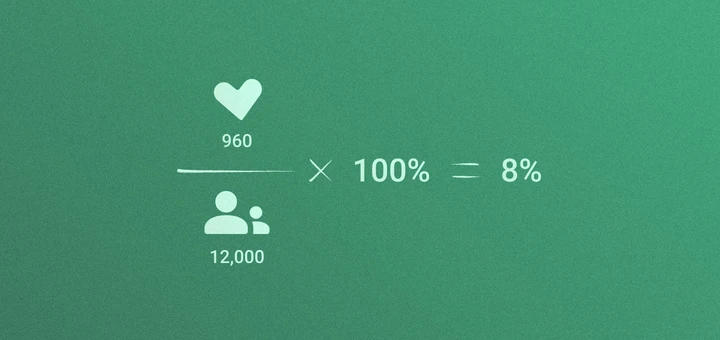
The calculator averages the visible likes and comments across a recent sample of public posts, divides that figure by the account's current follower count, then multiplies by 100.
(Average likes + average comments) ÷ followers × 100 = engagement rate
Here is the math with clean numbers. A creator averages 900 likes and 60 comments across recent posts and has 12,000 followers. The calculation is (960 ÷ 12,000) × 100, which returns an 8% engagement rate.
Follower-based ER is useful for screening public profiles because follower count, likes, and comments are visible without access to the creator's account. It is not the only way to calculate engagement. Reach-based ER is often better for campaign reporting because it measures reactions among people who actually saw the post.
For the full comparison of follower, reach, impression, view, and Story formulas, use the Instagram engagement rate guide.
Compare your result with Instagram engagement rate benchmarks
| Followers | 1k–5k | 5k–10k | 10k–50k | 50k–100k | 100k–500k | 500k–1m | 1m+ |
|---|---|---|---|---|---|---|---|
| High | > 7.97% | > 3.54% | > 2.61% | > 2.47% | > 2.63% | > 2.46% | > 2.6% |
| Above Average | 4.42 – 7.97% | 1.62 – 3.54% | 1.11 – 2.61% | 1.01 – 2.47% | 1.14 – 2.63% | 1.13 – 1.46% | 1.27 – 2.6% |
| Average | 3.38 – 4.42% | 1.25 – 1.62% | 0.84 – 1.11% | 0.75 – 1.01% | 0.87 – 1.14% | 0.88 – 1.13% | 1.02 – 1.27% |
| Below Average | 1.72 – 3.38% | 0.62 – 1.25% | 0.39 – 0.84% | 0.32 – 0.75% | 0.41 – 0.87% | 0.46 – 0.88% | 0.57 – 1.02% |
| Low | < 1.72% | < 0.62% | < 0.39% | < 0.32% | < 0.41% | < 0.46% | < 0.57% |
Find the best match for your next collab with an influencer
How to check engagement rate on Instagram in IQFluence
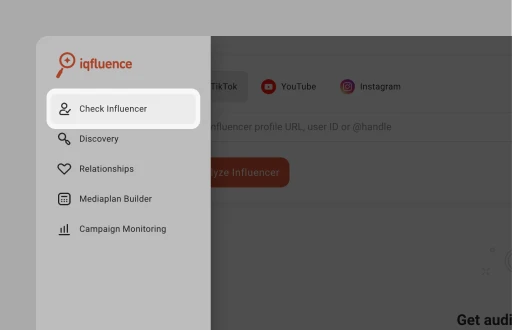 1First, pop open the left-hand menu and then hit up the Check Influencer section.
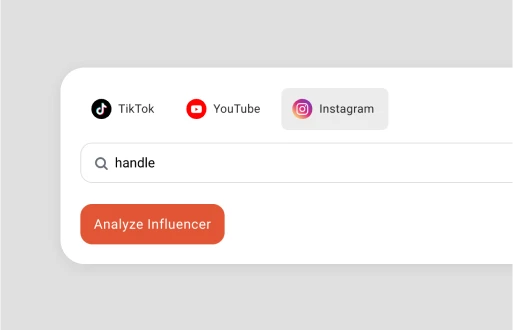 2Choose Instagram. Now, just drop in their profile link, user ID, or even just their @handle, and click Analyze Influencer.
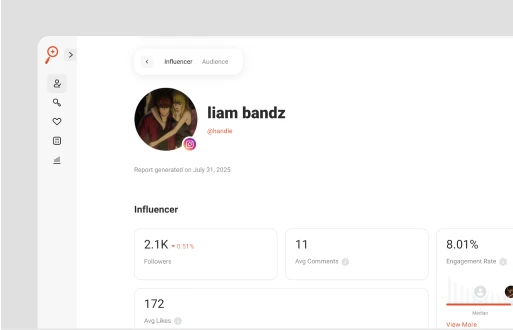 3You instantly get a full report in front of you, including engagement rate.
FAQs on free Instagram engagement rate calculator
For a public-profile estimate, add average likes and average comments across recent posts, divide by the current follower count, then multiply by 100. The formula is (average likes + average comments) ÷ followers × 100.
As often as you want. No caps, no login for the engagement rate itself. The deeper audience and reachability report opens with a free account.
-
It pulls the latest ~12–18 posts from any public or business account.
-
Averages likes + comments per post.
-
Divides that by follower count.
-
Multiplies by 100 to give you a percentage engagement rate.
Use Instagram Engagement Calculator free unlimited times — perfect for vetting influencers fast and easy.
Engagement isn’t just a simple metric like followers or views. It’s the real, natural connection your content sparks such as likes, comments, saves, shares, clicks, even DMs. Basically any time someone interacts with your post, that counts. In influencer-land, engagement is the percentage of your audience that interacts with your content, like the digital equivalent of a fist bump — proof people care.
For better instagram engagement rate calculation, grab the total likes + comments (you can include saves and shares). Then divide that by follower count — or reach for better accuracy — and multiply by 100.
Here’s a magic Instagram engagement rate formula: (Likes + Comments + Saves + Shares) ÷ Followers × 100%.
So if someone gets 500 likes + 50 comments, has 10K followers, that’s a 5.5% engagement rate.
-
Pick a few recent posts (say 5–10).
-
Add up likes, comments, saves, shares — total engagement.
-
Grab the follower count at posting time.
-
Do: (Total engagements ÷ Followers) × 100 → that’s your ER per post.
-
Average those ERs across posts for a trend.
-
Or save time — let your influencer tool auto-calc using these steps.
-
Simple, visual proof of who connects for real.
Leverage IQFluence engagement rate Instagram calculator to save time.
It can be strong, especially for a larger account, but follower tier and niche decide the comparison. Check recent-post consistency and audience quality before treating 5% as a green light.
It depends entirely on size, which is why a flat number misleads. Use the table above. As a rough read: nano creators under 10K often run 4 to 7%, mid-tier accounts settle around 1 to 3%, and anything above a million tends to sit near 1 to 2%. Smaller and more engaged usually beats big and quiet.
For Instagram, it’s all about authentic stories and reels that feel real — not perfect. I’ve noticed that behind-the-scenes clips, quick tips, and fun, relatable content get people talking and sharing. And don’t sleep on interactive stickers in Stories — they’re like tiny engagement magnets. If you want influencers who truly move the needle, look for those who keep it casual and connect, not just post polished ads. That’s where the magic happens.
If you want better Instagram engagement, it’s all about real connections. Post consistently stuff that actually helps or resonates with your audience — skip the hard sell. Stories and Reels get way more attention, so use those. And don’t just post — jump into comments and DMs like you’re chatting with buddies. When you’re hunting for TikTok influencers, pick the ones who naturally get people talking. That’s where the magic happens. Easy!
If your Instagram engagement’s low, don’t stress. First, rethink what you’re posting — are you really speaking your audience’s language? Mix it up with Stories, Reels, and interactive stuff like polls or questions. And here’s the kicker: get involved! Reply to comments and DMs like you’re hanging out with friends. When looking for Instagram influencers, find those who naturally create buzz, not just post pretty pics. Engagement comes from real connection, not just numbers.
Reels usually get more engagement than regular posts right now. Instagram’s really pushing reels, so they show up everywhere. But here’s the trick — if your reels don’t feel authentic or valuable, people won’t stick around. It’s not about format, it’s about how real and relatable the content is. So, whether it’s reels or posts, focus on connection.
Brands average about 0.5–1%, while influencers — depending on size—see:
-
Nano (1K–10K): ~4–5%
-
Micro (10K–100K): ~1.2–3.9%
-
Macro (100K–1M+): ~1–2%
Rule of thumb? If you're finding creators with 1–4% ER, you’re onto something solid — especially in niche B2B areas where trust and connection matter most.
Followers show reach on paper. Engagement shows whether anyone's actually paying attention. A creator with 50K engaged followers will usually outperform one with 500K who scrolled past, which is why it's the first metric worth checking before you pitch.
Yes. You can check a public profile's follower-based engagement rate without logging in or creating an account.
The profile must be public and have enough recent public posts to calculate a useful average. Private accounts cannot be analyzed from public data.
This calculator uses visible likes, comments, and follower count. Instagram Insights can also use reach, saves, shares, clicks, and other first-party interactions, so the formula and result may differ.
For more targeted results search for Instagram creators based on location or niche
IQFluence helps you find, analyze and control influencers for your product campaigns
Enjoy more free tools from IQFluence
- Free TikTok Engagement Rate CalculatorCheck the TikTok engagements of any account with a single click.
- Free YouTube Engagement Rate CalculatorTry our YouTube engagement rate calculator to find out the engagement of any account.
- Free Fake Follower CheckerSecure your budget by vetting any creators across TikTok, Instagram, and YouTube with a single click.