A1
Compare every creator’s numbers
Save hours on manual research
Every creator lands in the same grid, so you check them side by side without jumping tabs.

Turn creator links into one Google Sheet of comparable stats and view forecasts.
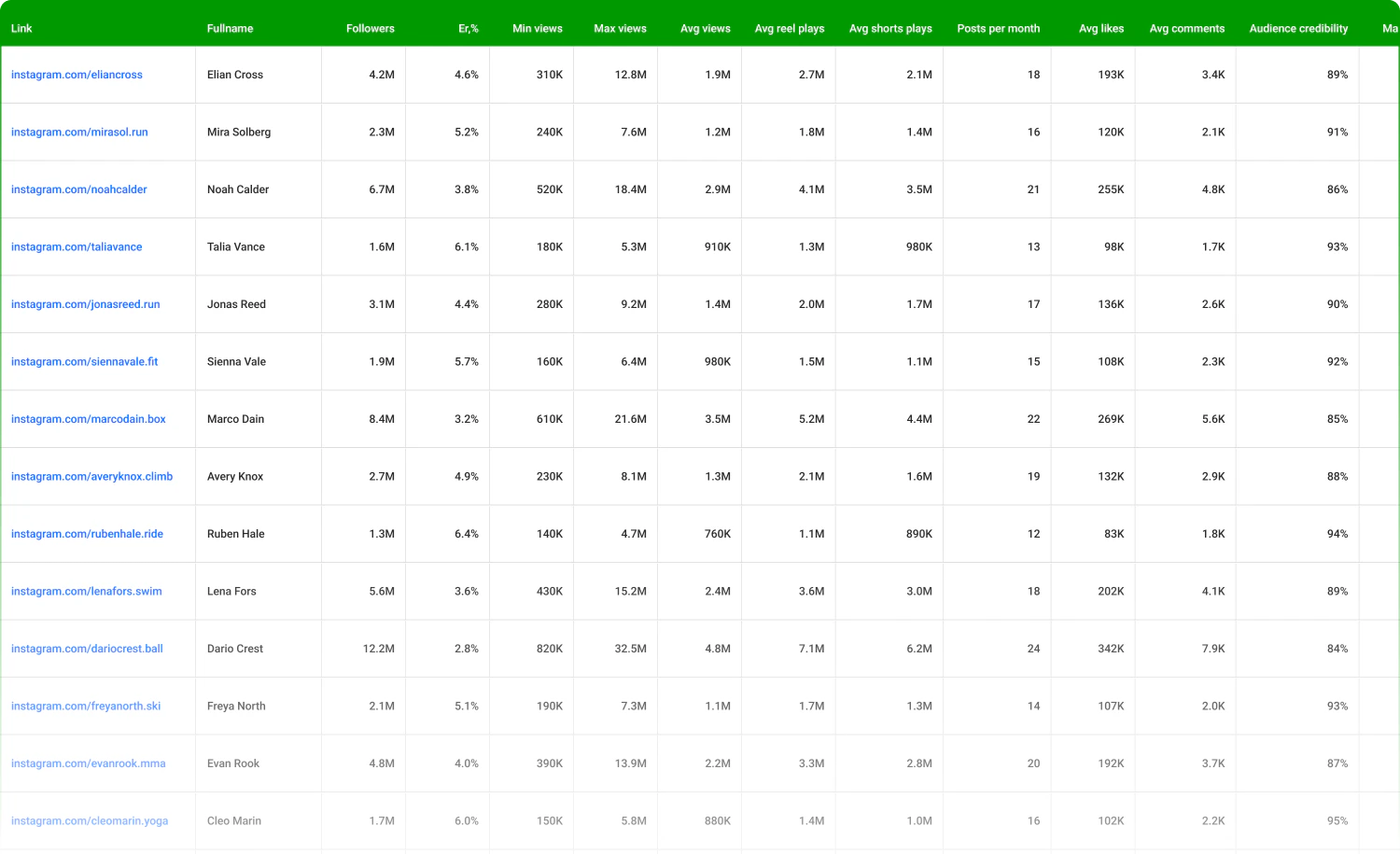
Mediaplan builder: Instagram, YouTube and TikTok creators on the same numbers, in one sheet
Featured in Influencer Marketing Hub Top Platforms 2026 • 5.0 on Capterra








Paste a profile link and the builder fetches the same fields for every creator, so nothing gets left off the sheet because someone forgot to screenshot it.


 LinkFull nameFollowersER%Min views (30d)Avg views (30d)Max views (30d)Posts per monthAvg likesAvg commentsGender splitAge bucketsTop countries & citiesEmailWhatsAppPhoneReports slot
Three jobs, one sheet
Every creator lands in the same grid, so you check them side by side without jumping tabs.
Min/avg/max view ranges give you a conservative-to-optimistic band you can defend to a client.
Share the Google Sheet link. Metrics, audience fit, and forecast ranges sit in one exec-friendly view.
Same columns, same 30-day window, every creator. Paste the links and the numbers arrive already formatted, with no screenshots to transcribe.
Search across 455M+ creators on Instagram, TikTok and YouTube
Featured in Influencer Marketing Hub Top Platforms 2026 • 5.0 on Capterra
No account needed
 Free influencer reports Browse pre-built reports on top creators, audience quality, engagement, and fake-follower flags included, without creating an account. See free reports
  Fake follower check Run a quick audience-quality check on any creator before you commit budget to outreach. Check a profile Instagram ER Calculator Average ER for any IG handle, in seconds. Search Instagram creators
  YouTube ER Calculator Avg views + ER for any channel. Search YouTube creators
  TikTok ER Calculator Recent post performance + ER for any TT handle. Search TikTok creators Instagram Email Finder Find the public business email behind an IG profile. Find Instagram emails TikTok Email Finder Pull the public email from any TikTok profile. Find TikTok emails YouTube Email Finder Get the business email listed on any YouTube channel. Find YouTube emails TikTok Analytics Tool Key metrics and performance overview for any TT account. Analyze a TikTok account Instagram Profile Analyzer Quick read on growth, post cadence, and engagement health. Analyze an Instagram profile Instagram Finder Search Instagram creators by niche, location, or keyword. Search Instagram creators TikTok User Search Find TikTok creators by username or keyword. Search TikTok creators YouTube Channel Finder Discover YouTube channels by topic or niche. Search YouTube creators Instagram Follower Tracker Track follower growth over time for any IG handle. Track Instagram followers TikTok Follower Count Check the current follower count for any TT account. Check TikTok followers YouTube Subscriber Count Live subscriber count for any YouTube channel. Check YouTube subscribers Instagram Bio Search Find Instagram profiles by keywords in their bio. Search Instagram bios YouTube Channel Crawler Crawl related channels from any YouTube starting point. Find related channels Instagram Email Scraper Extract public contact emails from IG profiles in bulk. Extract Instagram emails
 Built for agencies, brand teams and growth teams

Five clients, five briefs, and a different angle for each? Keep the work separate per brand so nothing bleeds between accounts, and hand the account team something they can forward without rebuilding it first.

Launching with no campaign history to lean on? Start from data instead of a hunch, and let the first campaign leave you with a benchmark the second one can be measured against.

Leadership wants efficiency, not screenshots? Every creator comes with the same metrics you already report on elsewhere, so influencer spend sits in the same conversation as the rest of acquisition.

Find creators across Instagram, YouTube and TikTok in a 455M-profile database, with 20+ filters for audience fit, engagement quality, and location.
Read more about Influencer Search
Analyze each creator’s profile and audience in one view: average likes, shares, views, engagement rate, post themes, plus audience age and location.
Read more about Influencer Analysis
IQFluence influencer reporting tool scoops the collab stats and does all the math, so you don’t have to.
Read more about Campaign Reporting
The IQFluence API provides audience demographic and psychographic attributes for Instagram, YouTube and TikTok, with user lookups by ID or username.
Read more about API integrationLink, full name, followers, ER%, min/avg/max views (last 30 days), posts per month, avg likes, avg comments, gender split with age buckets, top countries & cities (with %), plus outreach fields (email, WhatsApp, phone, Skype, Kakao, WeChat, Viber) and a reports slot.
Instagram, YouTube, and TikTok, standardized into one grid so you can compare creators side by side without jumping tabs.
The sheet pulls the most recent 30-day performance. Paste a profile link and you’ll see updated stats in seconds. Re-check any time to refresh.
ER% is based on last-30-day averages (likes plus comments relative to followers). Min/avg/max views are derived from the distribution of that creator’s recent posts, giving you a conservative-to-optimistic band you can defend.
It upgrades it. You still live in Google Sheets, but the metrics auto-populate, no manual copy and paste from screenshots or reports.
Mediaplan Builder is for pre-flight planning and comparison. Campaign Monitoring tracks live posts and calculates CTR/CPC/CPM/ER% post-launch. Use them together: plan, approve, monitor.
Your API key lives in the sheet’s API tab and is used only to fetch metrics for the profiles you input. Remove or rotate it any time. Access follows your Google sharing settings.
Drop in creator links and the sheet fills with 30-day stats, view ranges, and contacts, in one Google Sheet you can send as is.
Search across 455M+ creators on Instagram, TikTok and YouTube
Featured in Influencer Marketing Hub Top Platforms 2026 • 5.0 on Capterra